
Migrating thousands of SAS programs to a modern cloud analytics platform is one of the most consequential infrastructure decisions an enterprise can make. Done well, it eliminates seven-figure licensing costs, unlocks elastic compute, and positions the organization for modern data engineering practices. Done poorly, it creates months of rework, broken reports, and eroded stakeholder trust.
This checklist distills hard-won lessons from dozens of large-scale SAS-to-Snowflake and SAS-to-Databricks migrations into a repeatable, phase-gated framework. Whether you are a data engineering leader scoping an initiative or a program manager tracking delivery milestones, use this guide as your single source of truth.
Phase 1: Discovery & Inventory
Every successful migration begins with an honest assessment of what you actually have. Legacy SAS estates tend to accumulate undocumented programs, orphaned macros, and tribal knowledge locked in individual developer notebooks. The discovery phase transforms that ambiguity into a quantified scope.
Key Activities
- Catalog all SAS assets. Scan file systems, SAS metadata servers, and scheduling tools (Control-M, Autosys) to build a complete inventory of
.sasprograms, macro libraries, format catalogs, and autoexec configurations. - Map data lineage. Trace every
LIBNAMEstatement,PROC SQLpass-through connection, and flat-file reference to identify upstream sources and downstream consumers. - Classify complexity. Score each program by lines of code, number of unique PROC steps, macro nesting depth, and external dependencies. This drives effort estimation.
- Identify owners and schedules. Link each program to a business owner, execution frequency, and SLA. Programs that run nightly for regulatory reporting demand different treatment than ad-hoc analyst scripts.
- Document data volumes. Record row counts, table sizes, and peak processing windows. These numbers directly inform Snowflake warehouse sizing or Databricks cluster configuration.
MigryX Accelerator
MigryX automatically scans your SAS estate and produces a dependency graph, complexity score, and migration wave plan within hours, replacing weeks of manual inventory work.

MigryX migration methodology — Discover, Convert, Validate, Deploy
Phase 2: Code Analysis & Conversion Planning
With inventory in hand, the next step is deep analysis of the code itself. Not all SAS constructs have one-to-one equivalents in PySpark or Snowpark SQL, and understanding the gap early prevents surprises downstream.
Key Activities
- Parse and classify every PROC and DATA step. Identify the mix of PROC SQL, PROC SORT, PROC MEANS, PROC FREQ, DATA step merge logic, hash objects, array processing, and output delivery system (ODS) calls.
- Flag high-risk constructs. Items such as PROC IML (matrix language), PROC OPTMODEL (optimization), SAS/GRAPH, and custom CALL routines require specialized handling.
- Map SAS PROCs to target equivalents. For example,
PROC SORTmaps toORDER BYor.orderBy(), whilePROC TRANSPOSEmaps toPIVOTor.pivot(). - Define the macro translation strategy. Decide whether SAS macros become Python functions, Jinja templates, Databricks widgets, or parameterized Snowflake stored procedures.
- Establish wave groupings. Cluster interdependent programs into migration waves. Avoid breaking a pipeline by migrating the upstream job in wave 1 and the downstream consumer in wave 5.
MigryX Compass: From Chaos to Clarity
Every enterprise migration starts with the same challenge: understanding what you actually have. MigryX Compass scans your entire legacy estate — SAS programs, ETL jobs, stored procedures, macro libraries — and delivers a complete dependency graph, complexity score for every asset, and a recommended migration wave plan. What takes consulting teams weeks of manual inventory work, MigryX Compass accomplishes in hours.
Phase 3: Environment Setup & Infrastructure
Before converting a single line of code, the target environment must be production-ready. Skipping infrastructure hardening is the fastest way to derail a migration timeline.
Checklist Items
- Provision Snowflake account with appropriate edition (Enterprise or Business Critical) and configure network policies, SSO integration, and role-based access control.
- Or provision Databricks workspace with Unity Catalog, cluster policies, and IAM role bindings for cloud storage access.
- Set up CI/CD pipelines (GitHub Actions, Azure DevOps, or GitLab CI) with environments for dev, staging, and production.
- Configure orchestration tooling (Airflow, Dagster, Databricks Workflows, or Snowflake Tasks) with alerting and retry logic.
- Establish a data validation framework with automated comparison tooling between SAS output and target platform output.
- Create shared Python package repositories for reusable utility functions that replace SAS macro libraries.
Phase 4: Automated Conversion & Manual Refinement
This is where the bulk of the technical work happens. An automated conversion engine handles the deterministic, pattern-based translation, while engineers focus on the edge cases that require human judgment.
The goal of automation is not to eliminate engineering effort, but to redirect it from repetitive translation to high-value architectural decisions.
Key Activities
- Run the automated converter against each wave. Capture conversion logs, untranslated constructs, and confidence scores per file.
- Review and refine auto-generated code. Optimize join strategies, partitioning, and caching for the target platform.
- Translate SAS formats and informats to equivalent lookup tables or Python functions.
- Convert SAS macro libraries to shared Python modules with unit tests.
- Rewrite ODS report generation using platform-native visualization or BI tools.
Phase 5: Validation & Testing
Validation is the phase that separates professional migrations from reckless ones. Every converted program must produce output that matches the SAS original within defined tolerances.
Validation Layers
- Row-count validation. The simplest check: does the target produce the same number of rows as the source?
- Schema validation. Column names, data types, and nullable flags must match the expected contract.
- Cell-level comparison. For numeric columns, compare values within a configurable epsilon (typically 0.01 for financial data). For string columns, compare exact matches after normalization.
- Aggregate validation. Compare sums, means, min/max, and distinct counts across key dimensions.
- Edge-case testing. Run programs against null-heavy datasets, zero-row inputs, and maximum-cardinality joins to catch boundary conditions.
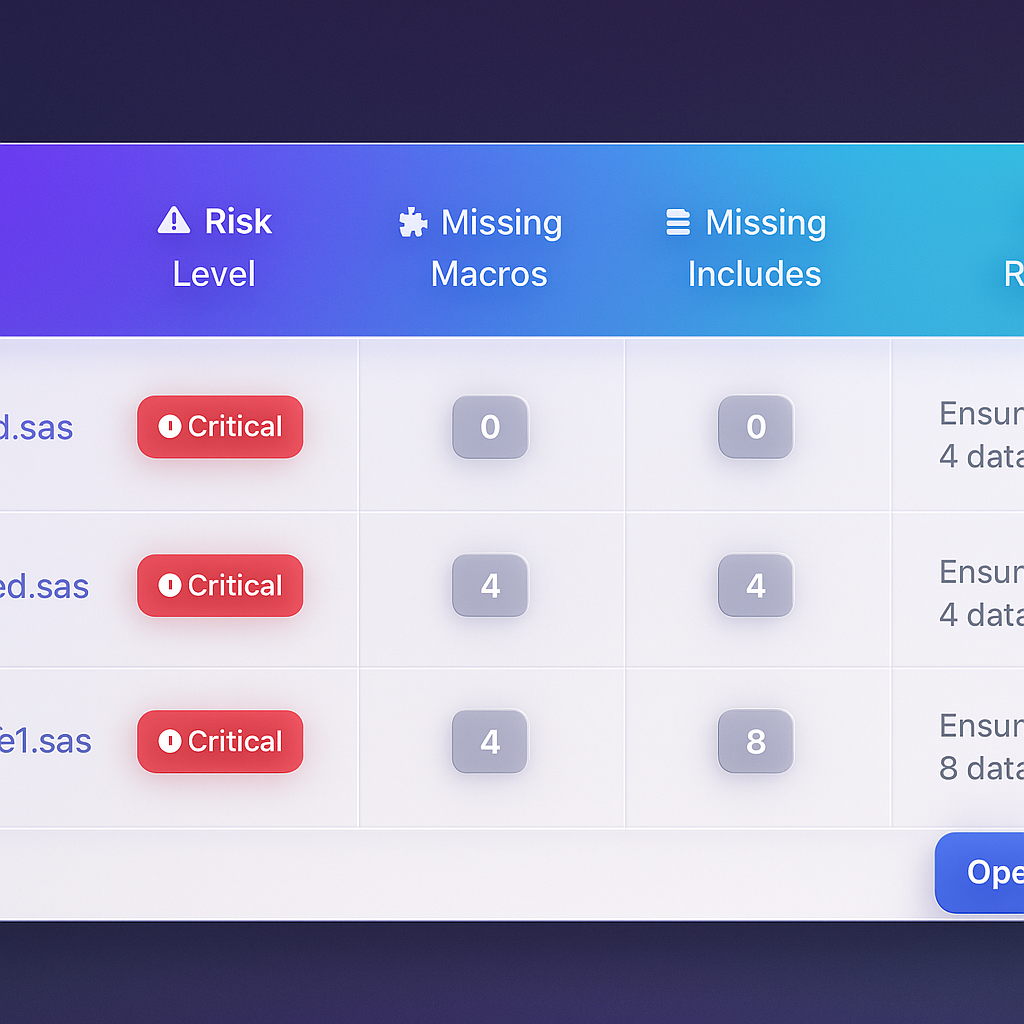
MigryX risk analysis identifies high-complexity programs and recommends optimal migration sequencing
Data-Driven Migration Planning with MigryX
MigryX does not just estimate complexity — it quantifies it. Every program receives a composite score based on lines of code, unique constructs, macro nesting depth, external dependencies, and data volume. Program managers use these scores to build realistic wave plans, allocate resources accurately, and set expectations with stakeholders based on data, not guesswork.
Phase 6: Deployment & Cutover
Deployment should be anticlimactic. If the previous phases were executed rigorously, cutover is simply flipping the orchestration schedule from SAS to the new platform.
Deployment Checklist
- Run parallel execution (SAS and target) for at least two full business cycles.
- Obtain sign-off from business owners on validation reports.
- Update downstream consumers (BI dashboards, APIs, flat-file exports) to point to new output locations.
- Disable SAS scheduled jobs and archive source code in version control.
- Monitor target platform performance, cost, and error rates for 30 days post-cutover.
Phase 7: Governance & Continuous Improvement
Migration is not a one-time event. The governance phase ensures that the new platform remains healthy, costs stay controlled, and the team continues to improve.
- Implement cost monitoring dashboards for Snowflake credit consumption or Databricks DBU usage.
- Establish code review standards for all new PySpark/Snowpark development.
- Schedule quarterly architecture reviews to identify optimization opportunities.
- Maintain a living runbook documenting operational procedures, escalation paths, and known issues.
Migration Phases & Deliverables Summary
| Phase | Duration (Typical) | Key Deliverables | Gate Criteria |
|---|---|---|---|
| 1. Discovery & Inventory | 2 - 4 weeks | Asset catalog, dependency graph, complexity scores | 100% of SAS assets cataloged |
| 2. Code Analysis | 2 - 3 weeks | Construct mapping, wave plan, risk register | Wave groupings approved by leads |
| 3. Environment Setup | 2 - 4 weeks | Provisioned environments, CI/CD, orchestration | End-to-end pipeline test passes |
| 4. Conversion | 6 - 16 weeks | Converted code, shared libraries, conversion logs | All programs converted and code-reviewed |
| 5. Validation | 3 - 6 weeks | Validation reports, sign-off documents | 100% of programs validated within tolerance |
| 6. Deployment | 2 - 4 weeks | Production cutover, monitoring dashboards | Parallel run successful for 2 cycles |
| 7. Governance | Ongoing | Cost dashboards, runbooks, review cadence | Monthly review meetings established |
Common Pitfalls to Avoid
Even with a solid checklist, teams routinely stumble on a few predictable mistakes:
- Underestimating macro complexity. SAS macro systems in large enterprises can be deeply nested and implicitly stateful. Budget extra time for macro translation and testing.
- Ignoring data encoding differences. SAS character encoding, date formats, and missing-value semantics differ from Python and SQL. Test edge cases early.
- Skipping parallel runs. The temptation to cut over quickly is strong, especially under budget pressure. Parallel execution is the single most effective risk-mitigation strategy.
- Treating migration as a lift-and-shift. The best outcomes come from teams that use migration as an opportunity to improve data architecture, not merely replicate it on a different platform.
A structured, phase-gated approach transforms what could be a chaotic multi-year effort into a predictable, measurable program. Use this checklist as your starting point, adapt it to your organization's specific constraints, and hold every phase to its gate criteria before advancing.
Why MigryX Is the Foundation of Every Successful Migration
The challenges described throughout this article are exactly what MigryX was built to solve. Here is how MigryX transforms this process:
- Automated discovery: MigryX Compass scans thousands of programs and produces a complete inventory with dependency mapping in hours.
- Complexity scoring: Every asset is scored by code complexity, data volume, and business criticality — enabling precise effort estimation.
- Wave planning: MigryX recommends optimal migration waves based on dependencies, ensuring no pipeline breaks mid-migration.
- 4-8x faster delivery: Enterprises using MigryX consistently report migration timelines compressed from years to months.
MigryX combines precision AST parsing with Merlin AI to deliver 99% accurate, production-ready migration — turning what used to be a multi-year manual effort into a streamlined, validated process. See it in action.
Ready to modernize your legacy code?
See how MigryX automates migration with precision, speed, and trust.
Schedule a Demo